Table

The Table API provides comprehensive management of restaurant table operations, including table assignments, customer information management, access control, order processing, and customer service requests.
diagram_tables_1

1 - Create an Empty Ticket on a Table

"Assign a table to guests by creating an empty ticket. Use this when guests are seated but have not yet placed an order."

Request

Definitions Example

{
    "requestType": String,
    "actionType": String,
    "tableNumber": Number,
    "opts": {
        "userName": String,
        "userID": String,
        "terminalID": String,
        "terminalNumber": String,
        "registerNumber": String,
        "destination": String
    }
}
            

{
    "requestType": "table",
    "actionType": "createTicket",
    "tableNumber": 4,
    "opts": {
        "userName": "GM3",
        "userID": "1",
        "terminalID": "1",
        "terminalNumber": "1",
        "registerNumber": "1",
        "destination": "DINE-IN"
    }
}
            

See definitions

Response

Definitions Example

{
    "status": String,
    "ticket": Object
}


{
    "status": "OK",
    "ticket": {...}
}

See definitions


1A - Create a Ticket with Initial Order

"Create a table assignment and process the initial order in a single operation. Use this when guests are ready to order immediately upon being seated."

Request

Definitions Example

{
    "requestType": String,
    "actionType": String,
    "tableNumber": Number,
    "opts": {
        "userName": String,
        "userID": String,
        "terminalID": String,
        "terminalNumber": String,
        "registerNumber": String,
        "destination": String
    },
    "cart": {
        "qty": Number,
        "subtotal": Number,
        "itemList": [{
            "menu_id": Number,
            "qty": Number,
            "id": String,
            "modifier_id": String,
            "subtotal": Number,
            "modifier": {
                "list": [{
                    "id": String,
                    "category_id": String,
                    "modifier_id": String,
                    "price": Number,
                    "name": String,
                    "text": String,
                    "action": String,
                    "qty": Number
                }],
                "price": Number
            },
            "name": String,
            "price": Number,
            "seat": Number,
            "taxTable": String[],
            "printerTable": String[],
            "report_screen": String,
            "report_department": String,
            "report_product": String,
            "lineID": String
        }]
    }
}
            

{
    "requestType": "table",
    "actionType": "createTicketWithOrder",
    "tableNumber": 4,
    "opts": {
        "userName": "GM3",
        "userID": "1",
        "terminalID": "1",
        "terminalNumber": "1",
        "registerNumber": "1",
        "destination": "DINE-IN"
    },
    "cart": {
        "qty": 3,
        "subtotal": 5197,
        "itemList": [{
            "menu_id": 1715030139097,
            "qty": 1,
            "id": "1720657001000",
            "modifier_id": "1715807449141",
            "subtotal": 1799,
            "modifier": {
                "list": [{
                    "id": "1715817774535",
                    "category_id": "1716334025116",
                    "modifier_id": "1715807449141",
                    "price": 0,
                    "name": "CLASSIC SANDWICH",
                    "text": "Classic Sandwich",
                    "action": "",
                    "qty": 1
                }],
                "price": 100
            },
            "name": "Sandwich Combo",
            "price": 1699,
            "seat": 1,
            "taxTable": ["YES"],
            "printerTable": ["YES"],
            "report_screen": "MAIN",
            "report_department": "LUNCH COMBO",
            "report_product": "SANDWICH COMBO",
            "lineID": "1720657001000"
        }]
    }
}
            

See definitions

Response

Definitions Example

{
    "status": String,
    "ticket": Object
}


{
    "status": "OK",
    "ticket": {...}
}

See definitions


2 - Void a Ticket on a Table

"Remove a table assignment and void the associated ticket when guests leave without completing their order."

Request

Definitions Example

{
    "requestType": String,
    "actionType": String,
    "tableNumber": Number,
    "orderNumber": String
}
            

{
    "requestType": "table",
    "actionType": "voidTicket",
    "tableNumber": 4,
    "orderNumber": "91001"
}
            

See definitions

Response

Definitions Example

{
    "status": String
}
            

{
    "status": "OK"
}
            

See definitions


diagram_tables_2

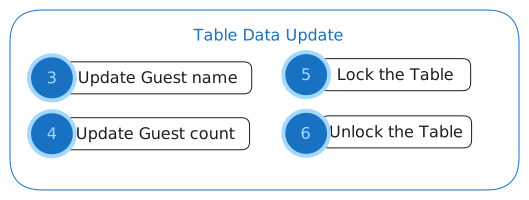
3 - Update Guest name

"In order to identify the tables in a better way, you can define your guest name."

Request

Definitions Example

{
    "requestType": String,
    "actionType": String,
    "tableNumber": Number,
    "customerName": String
}
            

{
    "requestType": "table",
    "actionType": "updateCustomerName",
    "tableNumber": 4,
    "customerName": "JONN DOE"
}
            

See definitions

Response

Definitions Example

{
    "status": String
}
            

{
    "status": "OK"
}
            

See definitions

4 - Update Guest count

"If the guest count gets bigger or smaller, you can update it."

Request
Definitions Example

{
    "requestType": String,
    "actionType": String,
    "tableNumber": Number,
    "guestCount": Number
}
            

{
    "requestType": "table",
    "actionType": "updateGuestCount",
    "tableNumber": 4,
    "guestCount": 2
}
            

See definitions

Response
Definitions Example

{
    "status": String
}
            

{
    "status": "OK"
}
            

See definitions

5 - Lock the table

"Let's say a free table is assigned to some guests. Your Verona POS should be the only one that can trigger tickets and order changes for that table, so let's "lock" it. ."

Request

Definitions Example

{
    "requestType": String,
    "actionType": String,
    "tableNumber": Number,
    "deviceNumber": String
}
            

{
    "requestType": "table",
    "actionType": "lock",
    "tableNumber": 2,
    "deviceNumber": "9001"
}
            

See definitions

Response

Definitions Example

{
    "status": String
}
            

{
    "status": "OK"
}
            

See definitions

6 - Unlock the table

"If necessary, you can also “unlock” it to allow modifications. ."

Request

Definitions Example

{
    "requestType": String,
    "actionType": String,
    "tableNumberList": Number[]
}
            

{
    "requestType": "table",
    "actionType": "unlock",
    "tableNumberList": [2, 3]
}
            

See definitions

Response

Definitions Example

{
    "status": String
}
            

{
    "status": "OK"
}
            

See definitions


diagram_tables_3

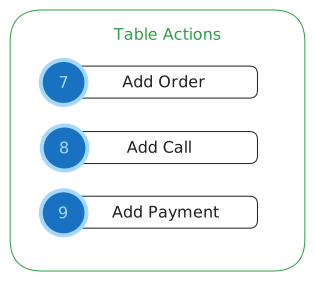
7 - Add Order

"When the guests are at the table and ready to place their order, you can add their order, enabling the POS to receive it.."

Request

Definitions Example

{
    "requestType": String,
    "actionType": String,
    "tableNumber": Number,
    "order": {
        "qty": Number,
        "subtotal": Number,
        "itemList": [{
            "menu_id": Number,
            "qty": Number,
            "id": String,
            "modifier_id": String,
            "subtotal": Number,
            "modifier": {
                "list": [{
                    "id": String,
                    "category_id": String,
                    "modifier_id": String,
                    "price": Number,
                    "name": String,
                    "text": String,
                    "action": String,
                    "qty": Number
                }],
                "price": Number
            },
            "name": String,
            "name_alt": String,
            "price": Number,
            "seat": Number,
            "taxTable": String[],
            "printerTable": String[],
            "report_screen": String,
            "report_department": String,
            "report_product": String,
            "report_product_alt": String,
            "lineID": String
        }]
    }
}
            

{
    "requestType": "table",
    "actionType": "addOrder",
    "tableNumber": 4,
    "order": {
        "qty": 3,
        "subtotal": 5197,
        "itemList": [{
            "menu_id": 1715030139097,
            "qty": 1,
            "id": "1720657001000",
            "modifier_id": "1715807449141",
            "subtotal": 1799,
            "modifier": {
                "list": [{
                    "id": "1715817774535",
                    "category_id": "1716334025116",
                    "modifier_id": "1715807449141",
                    "price": 0,
                    "name": "CLASSIC SANDWICH",
                    "text": "Classic Sandwich",
                    "action": "",
                    "qty": 1
                }],
                "price": 100
            },
            "name": "Sandwich Combo",
            "name_alt": "",
            "price": 1699,
            "seat": 1,
            "taxTable": ["YES"],
            "printerTable": ["YES", "YES", "YES"],
            "report_screen": "MAIN",
            "report_department": "LUNCH COMBO",
            "report_product": "SANDWICH COMBO",
            "report_product_alt": "",
            "lineID": "1720657001000"
        }]
    }
}
            

See definitions

Response

Definitions Example

{
    "STAGE": String
}
            

{
    "STAGE": "RECEIVED"
}
            

See definitions

8 - Add Call

"Great! The guests now have their orders and are having a good time. If a guest needs to request a refill or ask for something else, you can use this request to add a call for the specific table. .."

Request

Definitions Example

{
    "requestType": String,
    "actionType": String,
    "tableNumber": Number,
    "message": String
}
            

{
    "requestType": "table",
    "actionType": "addCall",
    "tableNumber": 4,
    "message": "Refill Drink"
}
            

See definitions

Response

Definitions Example

{
    "STAGE": String
}
            

{
    "STAGE": "RECEIVED"
}
            

See definitions

9 - Add Payment

"Right after the Guest pays its bill (using payment processor device), you can attach it to the system entry so the process is complete"

Request

Response

diagram_tables_4

10 - Get the call List

"That went well! By the way, if you need to track all the calls and requests across different tables, you can request a "Call list."

Request

Definitions Example

{
    "requestType": String,
    "actionType": String
}
            

{
    "requestType": "table",
    "actionType": "getCallList"
}
            

See definitions

Response

Definitions Example

{
    "status": String,
    "table_callList": Object
}
            

{
    "status": "OK",
    "table_callList": {}
}
            

See definitions

11 - Get the table status

"If you ever need to know the status of every table (locked, open, paid, order, etc), you can get the Status List. "

Request

Definitions Example

{
    "requestType": String,
    "actionType": String
}
            

{
    "requestType": "table",
    "actionType": "getStatusList"
}
            

See definitions

Response

Definitions Example

{
    "status": String,
    "table_statusList": Object,
    "table_ticketList": Object
}
            

{
    "status": "OK",
    "table_statusList": {
        "0": {
            "user": 4,
            "total": "1000",
            "status": "OPEN",
            "guestCount": "1",
            "modified": "1720030800"
        },
        "1": {
            "user": 4,
            "status": "LOCKED",
            "guestCount": "1",
            "lockedBy": "3",
            "lockedTime": "1721000013"
        },
        "2": {
            "user": 4,
            "total": "1300",
            "status": "PAID",
            "guestCount": "9",
            "modified": "1696292221"
        }
    },
    "table_ticketList": {
        "0": "3004",
        "4": "3006",
        "5": "3007"
    }
}
            

See definitions

12 - Get the table ticket List

"You can request the Ticket List associated with each table. "

Definitions Example

{
    "requestType": String,
    "actionType": String,
    "tableNumber": Number
}
            

{
    "requestType": "table",
    "actionType": "getTicketList",
    "tableNumber": "4"
}
            

See definitions

Response

Definitions Example

{
    "status": String,
    "ticketList": [{
        "id": Number,
        "change": Number,
        "tax": Number,
        "subtotal": Number,
        "total": Number,
        "list_item": [{
            "type": String,
            "product_id": String,
            "name": String,
            "price": Number,
            "subtotal": Number,
            "total": Number,
            "qty": Number,
            "seat": Number,
            "id": String,
            "menu_id": String,
            "report_screen": String,
            "report_department": String,
            "report_product": String,
            "created": Number,
            "modified": Number
        }],
        "status": String,
        "user_id": String,
        "user_name": String,
        "terminal_id": String,
        "number": Number,
        "created": Number,
        "created_date": String,
        "created_time": String,
        "table_number": Number,
        "table_name": String,
        "guest_count": Number
    }]
}
            

{
    "status": "OK",
    "ticketList": [{
        "id": 0,
        "change": 0,
        "tax": 0,
        "subtotal": 100,
        "total": 103,
        "list_item": [{
            "type": "ITEM",
            "product_id": "1448076018002",
            "name": "New Menu",
            "price": 0,
            "subtotal": 0,
            "total": 0,
            "qty": 1,
            "seat": 1,
            "id": "1720632049035",
            "menu_id": "1448076018002",
            "report_screen": "MAIN",
            "report_department": "MODIFIER",
            "report_product": "NEW MENU",
            "created": 1720632049,
            "modified": 1720632049
        }],
        "status": "OPEN",
        "user_id": "4",
        "user_name": "GM",
        "terminal_id": "34",
        "number": 3006,
        "created": 1720632054,
        "created_date": "07/10/2024",
        "created_time": "02:20:54 PM",
        "table_number": 4,
        "table_name": "A4",
        "guest_count": 2
    }]
}
            

See definitions

Definitions

Request definitions

Definition Type Description
actionType String Unique action identifier for your request. ("getStatusList", "getCallList", "getTicketList", "createTicket", "createTicketWithOrder", "addOrder", "addCall", "lock", "unlock", "updateCustomerName", "updateGuestCount", "voidTicket")
tableNumber String
opts Object The unique identifier for a specific table within the restaurant.
order Object The complete set of items requested by a customer at the restaurant.
orderNumber String A unique identifier assigned to each customer's order for tracking and reference purposes.
deviceNumber String A unique identifier for the device (e.g., tablet or terminal) used to place or process the order in the restaurant.
tableNumberList String[] A list of table identifiers.
customerName String The name of the customer placing the order, used for identification and personalization purposes.
guestCount String The total number of guests or individuals seated at a specific table.

Response definitions

Definition Type Description
STAGE String -
status String Request status.
table_callList Object A list of requests or calls made by tables, such as service requests or assistance notifications, typically used to track customer needs at different tables.
table_statusList Object[] A list of the current statuses for various tables, indicating availability, occupancy, or other relevant states within the restaurant.
table_ticketList String A list of tickets or receipts associated with a table, detailing orders placed, payment statuses, and any outstanding charges.